How to connect a domain to a website, step by step
To connect a domain to a website (also called pointing a domain), you tell your registrar where the website lives. The easiest way is to replace the domain's nameservers with the ones your host or website builder gives you — it then sets up all records and SSL itself. The other way is to add an A record with the IP address your host gives you. Setup takes 5 minutes and is free; the change goes live within an hour to a day.
Two ways to point a domain to a website
| Change nameservers (easier) | A record | |
|---|---|---|
| What you change | Once — who manages all of the domain's settings | Two records: for @ and www |
| What your host gives you | Two to four nameserver addresses | The server's IP address |
| Who sets up records and SSL | The host — automatically | You — by hand |
| Email on the domain | A good host copies the email records for you | Not affected |
Step 1. Get the details from your host or website builder
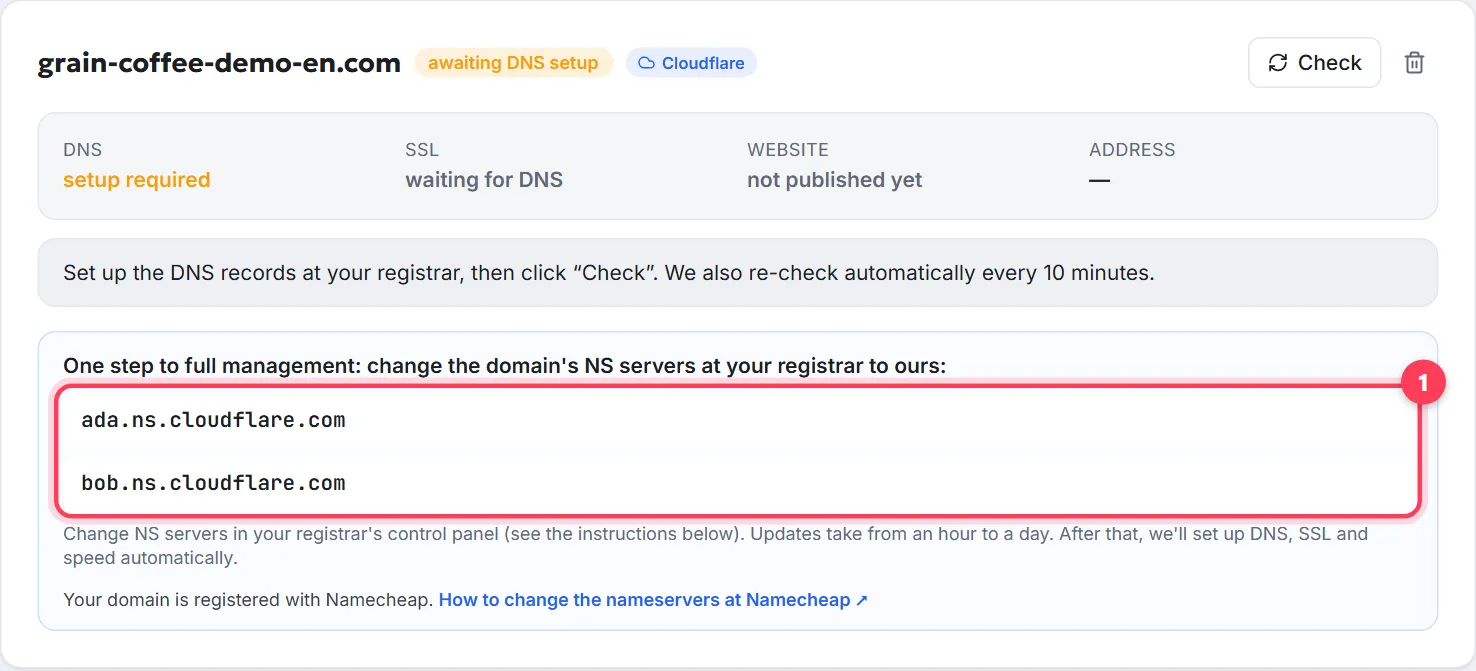
Whoever builds or hosts your website gives you these details — your host, website builder or agency, usually in its dashboard under “Domains”. It's either nameservers (use method 1 — the easiest) or an IP address (method 2). In the WebFora dashboard, for example, you get two nameservers and nothing else to enter.
Method 1 (easiest): change the nameservers
Step 1
Find the nameservers section at your registrar
It's usually called Nameservers or DNS servers and sits on the domain's page, next to the DNS settings.
Step 2
Switch to custom nameservers and paste the new ones
Choose Custom DNS / Custom nameservers, remove the old addresses and paste all the addresses your host gave you (usually two). Save. That's all — the records, IP and SSL are set up by whoever owns the nameservers you entered.
Step 3
Wait for the update
A nameserver change spreads across the internet in an hour to a day. Meanwhile the website may open the old way for some visitors and the new way for others — that's normal.
Method 2: add an A record (and www) at your registrar
Use this when your host gave you an IP address instead of nameservers, or when DNS must stay with you. Below we use Cloudflare's DNS panel as the example — other registrars work the same way, only the button names differ (see the list further down). The addresses in the screenshots are examples.
Step 1
Open the domain's DNS records
In your registrar's panel choose the domain and the DNS / Records / Zone editor section. Check whether A records for
@(the domain itself, 1 in the screenshot) andwww(2) already exist — if they point to an old website, edit them instead of adding second ones. New records are added with Add record (3).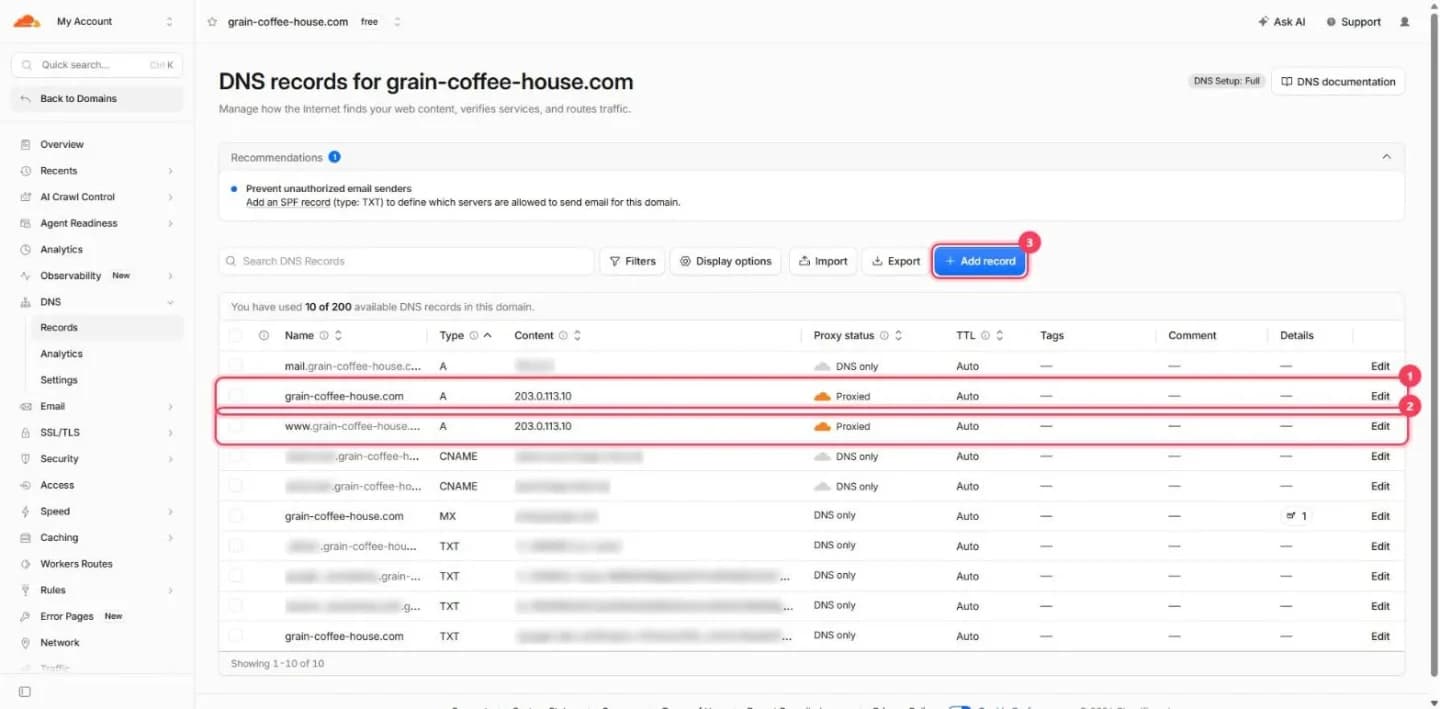
DNS records in Cloudflare. Domain and addresses replaced with an example; service records hidden. Step 2
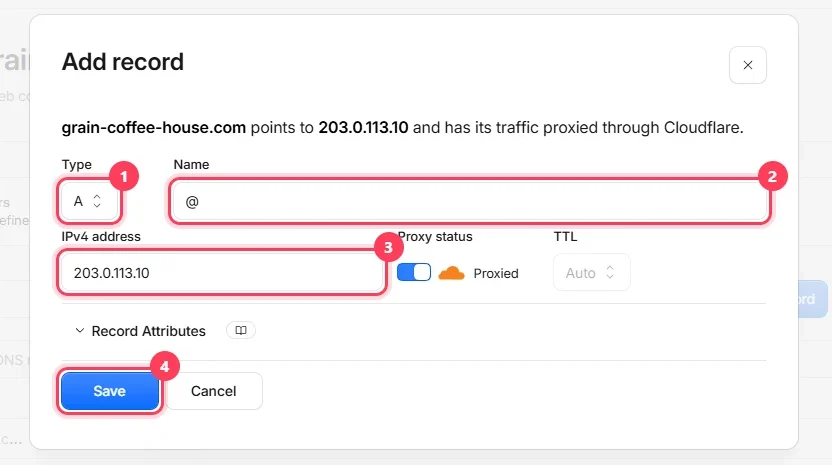
Fill in the record
Type
A(1), name@(2), value — the IP address your host gave you (3). Leave TTL on “Auto”. Save (4). Then add a record namedwwwthe same way — or aCNAMEnamedwwwpointing to your domain, if that's what your host recommends.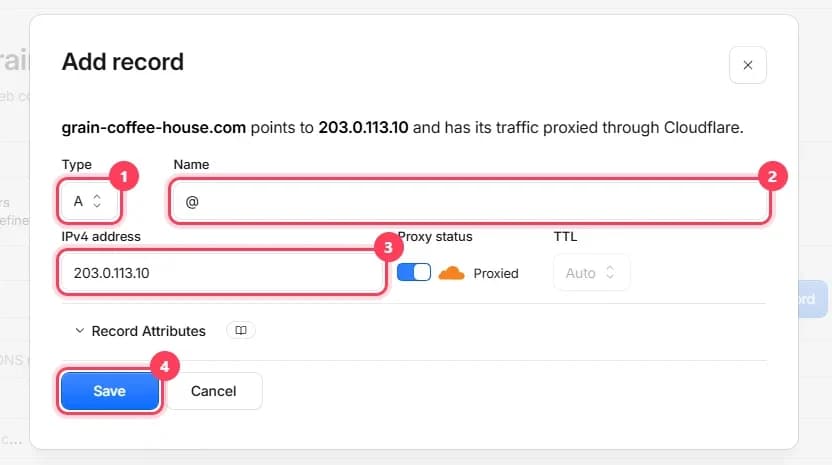
Cloudflare's new-record form: type, name, address, save. Step 3
Verify ownership if asked
Many services ask for one more record — a
TXTrecord with a verification code. Add it the same way: typeTXT, with the name and value exactly as your service shows.
Where to change DNS at GoDaddy, Namecheap, Porkbun, IONOS
| Registrar | DNS records | Nameservers |
|---|---|---|
| Namecheap | Domain List → Manage → Advanced DNS | Domain List → Manage → Nameservers → Custom DNS |
| GoDaddy | My Products → domain → DNS | DNS → Nameservers → Change |
| Porkbun | Domain Management → DNS | Domain Management → Authoritative Nameservers |
| IONOS | Domains & SSL → domain → DNS | Domain → Name server settings |
| Cloudflare | Domain → DNS → Records | Cloudflare Registrar domains can't change nameservers — records only |
Registrars rename sections from time to time; if you can't find it, search your registrar's help for “nameservers” or “DNS records”. Screen-by-screen guides: Namecheap, GoDaddy, Porkbun, IONOS, Cloudflare.
How long it takes for a domain to connect, and how to check
Check your domain
Enter a domain to see its current nameservers, where the website points, whether www and email are set up, and which registrar it's with.
- A records usually work within 15–60 minutes, nameservers within 1–24 hours. More detail: how long DNS takes to propagate.
- To see where the domain points right now, use a free tool like
dnschecker.orgorwhatsmydns.net: enter the domain, choose typeA— your IP should show up. - If your browser still shows the old site, try a private window or another network — the browser may have cached the old address.
- Once the domain works, your host issues an SSL certificate (the
httpspadlock) — usually within minutes. See SSL certificate for your domain.
Domain not showing your website? Common mistakes
- Two A records for
@with different IPs — the old one and the new one. Half your visitors land on the old site. Delete the old record. - Forgetting
www. The site opens ondomain.combut not onwww.domain.com— you need the second record. - The domain twice in the record name: typing
domain.comin the Name field, which the panel turns intodomain.com.domain.com. Use@for the root. - Changing nameservers and losing email. Before switching nameservers, make sure the email records (MX, TXT) will exist on the new ones.
- Domain forwarding instead of DNS. A “forward” or redirect sends visitors to your host's temporary address, and that's what they see in the address bar. Use nameservers or an A record instead.
- The registrar's parking page still shows. The nameservers still point to the registrar's parking service, or the change hasn't spread yet — check with the tool above.
FAQ
Is it better to change nameservers or add an A record?+
Nameservers are easier: you paste the addresses once and the host sets up all records and SSL. A records if your host only gave you an IP, or you want to manage the domain's other services yourself. Both are equally reliable.
How long until my website opens on the domain?+
Usually 15–60 minutes after adding A records, and 1–24 hours after changing nameservers. You can check on dnschecker.org or whatsmydns.net.
Why does my site open without www but not with www?+
There's no record for www. Add an A record named www with the same IP (or a CNAME www pointing to the main domain, if your host recommends it).
Will changing nameservers break my email?+
It can, if the new nameservers don't have your email records (MX and TXT). Good hosts copy them automatically; if unsure, use the A-record method — it doesn't touch email.
Can I connect one domain to two websites?+
One address goes to one website. But you can split by subdomain: the main site on domain.com and a shop on shop.domain.com — each with its own record.
Is it free to connect a domain to a website?+
Yes. Changing nameservers or DNS records at your registrar costs nothing. You only pay for the domain itself and for the website or hosting.
Do I need to transfer my domain to my web host?+
No. Pointing the domain is enough — it can stay at the registrar where you bought it. A transfer only changes who you pay the renewal to.
Why does my domain still show the old site or a parking page?+
Either the change hasn't spread yet (wait up to 24 hours), an old A record is still there, or your browser cached the old address. Check with dnschecker.org and try a private window.
Was this guide helpful?
Related guides
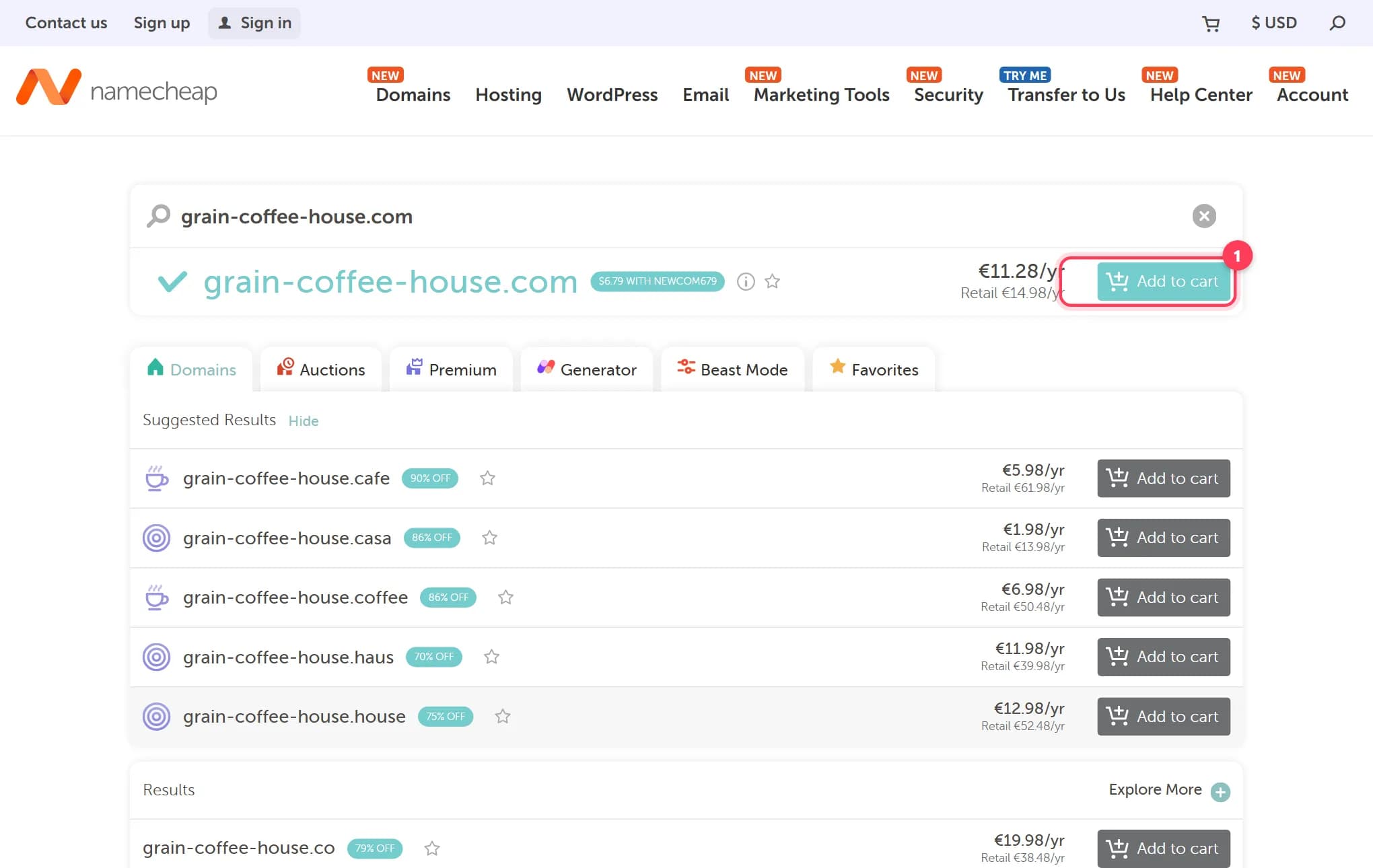
How to buy a domain name for your website, step by step
Buy a domain name in 15 minutes: where to buy, what it costs per year, how to dodge renewal traps and upsells. Real registrar screenshots, checked 2026.
9 min read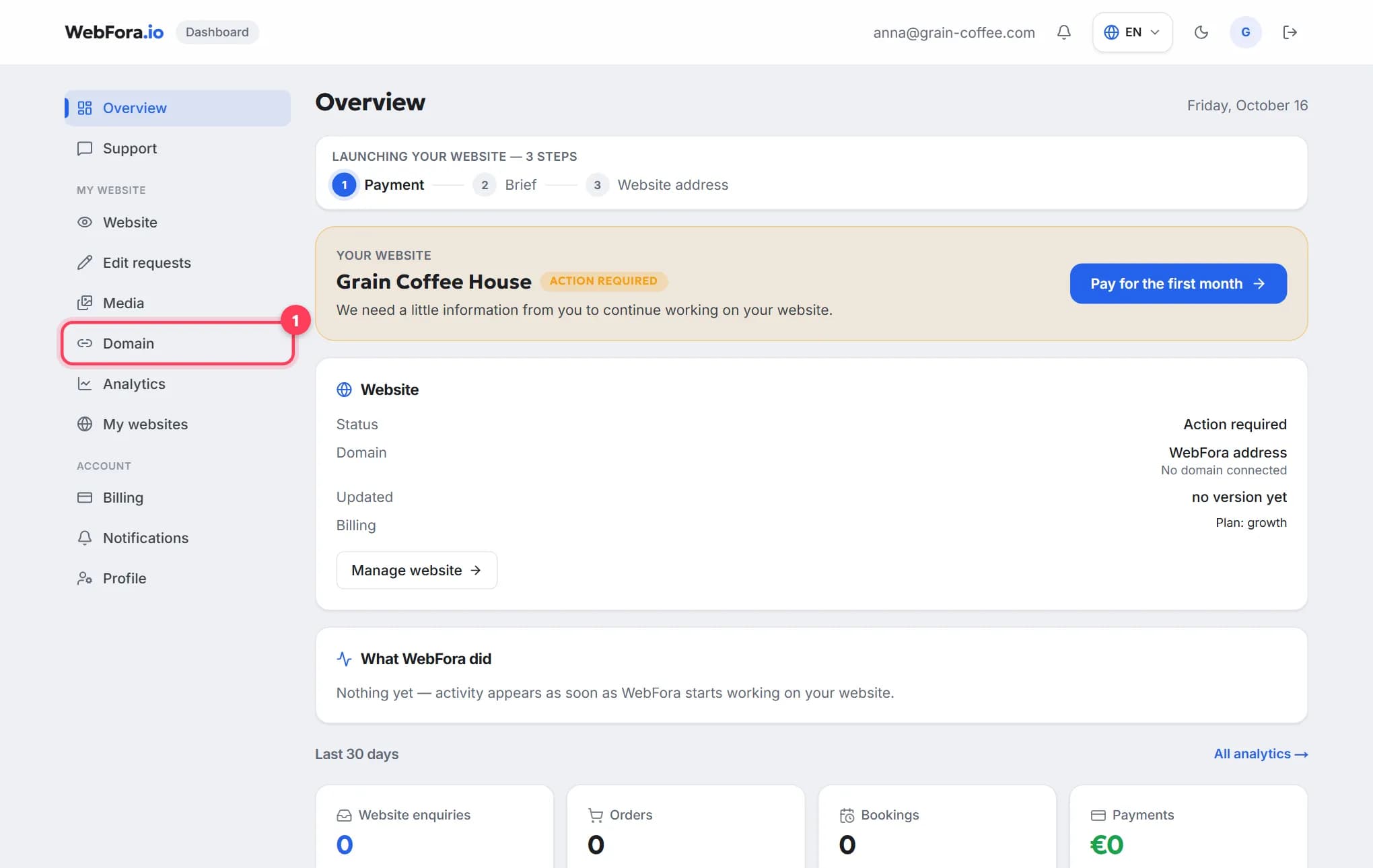
How to connect your own (custom) domain to your WebFora website
Connect your own domain to your WebFora website in 5 minutes: enter it in the dashboard, set two nameservers at your registrar — we do DNS, SSL and HTTPS.
6 min readHow long DNS changes take to propagate — and how to check
How long does DNS take to propagate? Real timings for A records and nameservers, what TTL means, why one device sees the site and another doesn't.
6 min read