SSL certificate for a website: what it is and how to get one free
An SSL certificate is what turns `http://` into `https://` and shows the padlock in the browser: it encrypts everything between the visitor and your site and confirms the site really belongs to your domain. For a business website a **free** certificate (Let's Encrypt, Cloudflare) is exactly as secure as a paid one — browsers treat them identically. On WebFora the certificate is issued automatically a few minutes after your domain connects; nothing to buy or renew.
What SSL/HTTPS gives a business website
- Trust. Without a certificate Chrome writes “Not secure” next to your address. Visitors leave; forms feel unsafe to fill in.
- Encryption. Names, phones and messages from your contact form travel scrambled — nobody on public Wi-Fi can read them.
- Google. HTTPS has been a ranking signal since 2014, and many features (payments, geolocation, PWA) only work over HTTPSHTTPS is the encrypted version of the web protocol: the padlock in the address bar. It needs an SSL certificate on the site and is expected by Google, browsers and visitors for every business website.→.
- Ads and integrations. Google Ads, Meta pixels, booking widgets and payment buttons expect an HTTPS page.
Free or paid certificate: what actually differs
| Free (Let's Encrypt, ZeroSSL, Cloudflare) | Paid (DigiCert, Sectigo, GoDaddy…) | |
|---|---|---|
| Encryption strength | Identical | Identical |
| Padlock in the browser | Yes | Yes — no visual difference since 2019 |
| Validation | Domain (DV): proves you control the domain | DV, or OV/EV: the company is checked by documents |
| Lifetime | 90 days, renewed automatically | 1 year, renewed by hand (and paid again) |
| Who needs it | Any website, shop or clinic site | Banks, large corporations, some compliance regimes |
For a salon, café, workshop or clinic a free DV certificate is the right choice. Your registrar may offer a paid certificate at checkout — you can safely skip it if your website platform issues one for free (most modern hosts and all website builders do).
On WebFora the certificate is automatic
Step 1
Connect your domain
Set the two nameservers from your dashboard at your registrar — the whole procedure is in Connecting a domain in the WebFora dashboard.
Step 2
Wait for DNS, then a few minutes more
As soon as the domain points to us, the card shows “DNS verified — issuing SSL certificate”. Usually it takes a few minutes; the site is already reachable over http meanwhile.
Step 3
Done — and it stays done
The card status becomes “live”: DNS, SSL and the website respond. Renewal is automatic every 90 days;
http://is redirected tohttps://;wwwis covered too. If issuance fails, the card says so and we retry automatically — if it keeps failing, your manager will look into it.
Padlock errors: what the browser says and why
| What you see | Likely cause | What to do |
|---|---|---|
| “Not secure” / no padlock, page opens | The site is served over plain http — no certificate, or no redirect to https | Issue a certificate at your host; on WebFora wait for the “live” status or ask the manager |
“Your connection is not private”, ERR_CERT_DATE_INVALID | The certificate expired (or the device clock is wrong) | Renew; check the computer's date and time |
ERR_CERT_COMMON_NAME_INVALID | The certificate is for a different name — e.g. issued for domain.com but you opened www.domain.com, or DNS points to a server that doesn't know your domain yet | Check DNS points to the right host; make sure www is included |
ERR_CERT_AUTHORITY_INVALID | Self-signed or unknown issuer — typical for a host's temporary certificate before the real one is issued | Wait for the real certificate; don't click “proceed” on a live business site |
| Cloudflare error 525 / 526 | The proxy (Cloudflare) can't make a secure connection to the server behind it | Host's problem (origin certificate / SSL mode) — on WebFora, message your manager |
| Padlock with a warning triangle, or “parts of this page are not secure” | Mixed content (see below) — an image, script or font is loaded over http | Fix the http links in the page content |
Mixed content: the padlock is there but “not fully secure”
The page itself loads over HTTPS, but one element inside it — an image, a video embed, a font, a map or an old widget — is still requested over http://. Browsers either block that element (a broken image, a missing map) or show a warning instead of a clean padlock. The cause is almost always a hard-coded http:// link in the content or in a pasted embed code.
- Open the page in Chrome → right-click → Inspect → Console: lines starting with “Mixed Content” name the exact file.
- Replace
http://withhttps://in the link, or re-paste the embed code from the service (most now give https by default). - If the external resource has no https version — download it and host it on your own site.
- On WebFora you don't hunt for this yourself: send your manager the page address and they'll fix the element.
How to check your website's certificate
- Open the site, click the padlock (or the “tune” icon in newer Chrome) → Connection is secure → Certificate: you'll see who issued it, for which names, and the expiry date.
- Check both
https://domain.comandhttps://www.domain.com, and thathttp://redirects to https. - Free deep check:
ssllabs.com/ssltest— enter the domain, wait a minute; grade A or A+ is what a well-set-up site gets. - Check the domain itself with our tool in How to connect a domain — if DNS points to the wrong place, no certificate will help.
- Put the expiry date in your calendar only if the certificate is renewed by hand; automatic ones (WebFora, Let's Encrypt) need no reminders.
Common mistakes
- Buying a certificate from the registrar when the website platform already issues one — paid twice, and often never installed.
- Certificate only for the apex, not
www(or vice versa) — half the visitors get an error. A modern host covers both; check both addresses. - No redirect from http to https — the secure version exists, but old links and bookmarks still open the insecure one.
- Letting a manual certificate expire. Paid one-year certificates don't renew themselves; the site goes down on the expiry day.
- Clicking “Proceed anyway” on your own site and assuming visitors will too. They won't.
- Pointing the domain to a new host while the old certificate is cached and panicking at the error — give it up to an hour.
FAQ
Is a free SSL certificate as secure as a paid one?+
Yes. The encryption is identical and browsers show the same padlock. Paid certificates add organisation validation (OV/EV) and a warranty — relevant for banks and large corporations, not for a local business site.
Do I have to buy SSL on WebFora?+
No. After your domain connects we issue a Let's Encrypt-type certificate automatically within minutes, renew it every 90 days and redirect http to https. It's part of the subscription.
Why does my site say “Not secure” in Chrome?+
The page is loading over http — either no certificate is installed, or there's no redirect to https. Open the https:// version; if it errors, the certificate isn't issued yet or expired.
How long does it take to get an SSL certificate?+
Free DV certificates are issued in seconds to minutes once the domain's DNS points to the host. The waiting is usually for DNS propagation, not for the certificate.
Why does my SSL work without www but not with www?+
The certificate was issued for one name only, or there's no DNS record for www. Both names need a DNS record and both need to be in the certificate — hosts normally include both automatically.
What is mixed content?+
An https page that loads some element (image, script, font, embed) over http. The browser blocks it or removes the clean padlock. Fix the http:// link in the content.
How long is an SSL certificate valid?+
Free automated certificates — 90 days, renewed automatically. Paid ones — up to about a year, renewed manually. Browser rules are shortening the maximum lifetime over the coming years, which makes automatic renewal the only sensible option.
What's the difference between SSL and TLS?+
TLS is the current version of the protocol that replaced SSL years ago. The name “SSL certificate” stuck; every certificate issued today is actually used for TLS.
Was this guide helpful?
Related guides
How to connect your own (custom) domain to your WebFora website
Connect your own domain to your WebFora website in 5 minutes: enter it in the dashboard, set two nameservers at your registrar — we do DNS, SSL and HTTPS.
6 min readDomain not working? Bought a domain but the website doesn't open: a 10-minute checklist
Domain not working after you bought it? Check in order: expired domain, no records, wrong nameservers, propagation, www, SSL, cache, parking page.
8 min read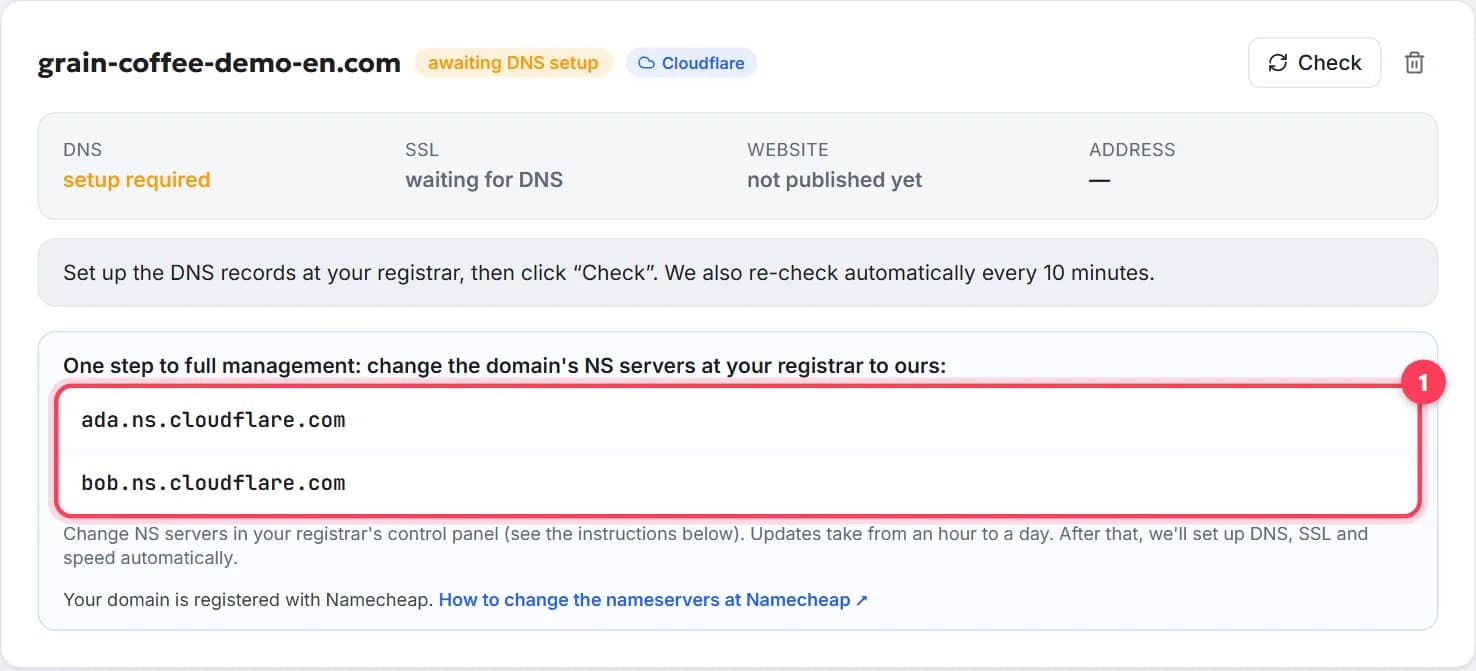
How to connect a domain to a website, step by step
Point your domain to your website in 5 minutes, free: nameservers or A record, where to click at GoDaddy or Namecheap, how long it takes, how to check.
8 min read