Your domain at Porkbun: change nameservers, DNS records, transfer and renewal
At Porkbun every setting of a domain is behind the Details button on the Domain Management page: the Nameservers edit icon, DNS Records, Get Authorization Code. To connect the domain to a website you paste the two nameservers your provider gives you into the Nameservers pop-up and click Save Nameservers. This page covers each screen.
Buying a domain at Porkbun
Porkbun is a US RegistrarA registrar is the company you buy and renew a domain from (GoDaddy, Namecheap, IONOS…). Its control panel is where you change nameservers, DNS records and renewal settings.→ known for low renewal prices, free WHOIS privacy and a plain, fast panel. Search for the name on porkbun.com, add it to the cart and look at the renewal price next to the first-year price — Porkbun shows both. The general checklist is in How to buy a domain.
Confirm your email and WHOIS privacy
- After the first purchase Porkbun emails a contact verification link (ICANN rule). Click it within 15 days or the domain is suspended.
- WHOISWHOIS is the public lookup that shows who registered a domain, when it expires and which nameservers it uses. Most registrars hide personal details with free privacy protection.→ privacy is free and on by default — the public record shows Porkbun's proxy details instead of yours. You can see the status in the domain's Details.
- Turn on two-factor authentication in Account → Settings — the account is the domain.
Change nameservers at Porkbun (connect the domain to a website)
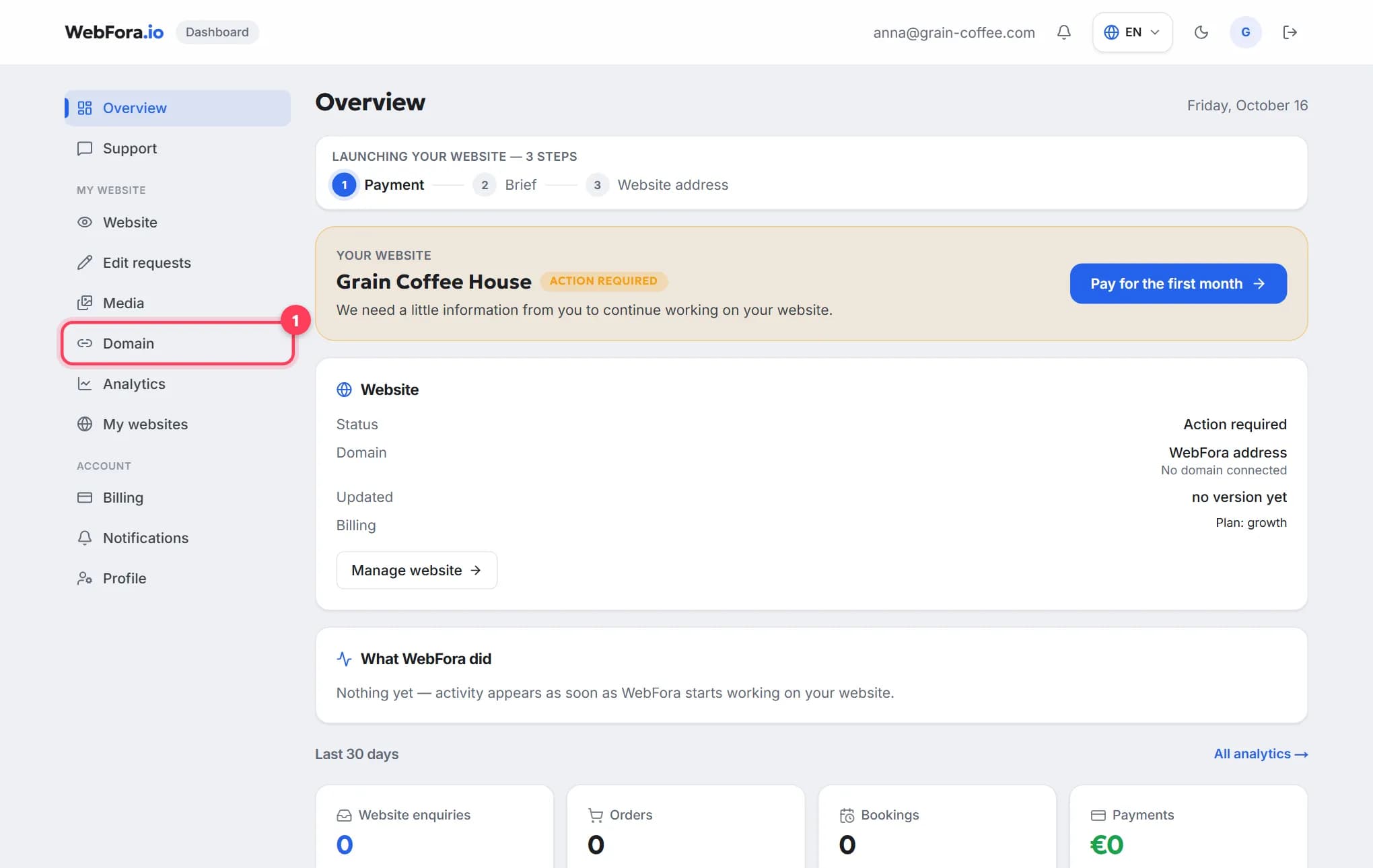
The step a WebFora client needs. Nameservers (NS)Nameservers are the servers that hold your domain's DNS records. Changing them (usually two addresses like ns1.example.net) hands the whole DNS setup to a new provider — the simplest way to connect a domain to a website.→ decide who manages the domain's settings. Your WebFora dashboard (section “Domain”) shows two addresses like ….ns.cloudflare.com; paste them here and we handle DNS records, SSL and HTTPS. No IP addresses are ever needed.
Step 1
Open Domain Management
Sign in at porkbun.com — you land on Domain Management. If you're already signed in, click ACCOUNT in the top-right corner and choose Domain Management.
Step 2
Open Details → Nameservers
Find the domain and click Details at the far right of its row. Locate the Nameservers field and click its edit (pencil) icon. A pop-up shows the current nameservers — Porkbun's own ones if you never changed them.
Step 3
Replace them with the two from your WebFora dashboard
Delete the existing entries and paste your two nameservers one per line, exactly as shown in the dashboard. Click Save Nameservers; if a confirmation appears, click Submit. How to know it worked: the Details panel now lists your two addresses.
Step 4
Wait and check
Porkbun says changes can take up to 48 hours, most locations see them within a few hours. WebFora re-checks the domain every 10 minutes and turns on SSL automatically; the dashboard status becomes “live”. Check the current nameservers with the tool below.
Check your domain
Enter a domain to see its current nameservers, where the website points, whether www and email are set up, and which registrar it's with.
DNS records at Porkbun (A, CNAME, TXT) — the fallback method
Needed only if you keep Porkbun's nameservers and connect the website with records instead. The WebFora dashboard shows the exact records in the “Connect with an A record” card — copy them from there; this page lists no values.
Step 1
Open Details → DNS Records
Domain Management → Details next to the domain → the edit icon next to DNS Records. The Manage DNS Records screen opens.
Step 2
Click Add Record
Choose the Type (A recordAn A record is the DNS entry that says «this name lives at this IPv4 address». It's how a domain is pointed at a server when you connect by IP instead of changing nameservers.→, CNAME recordA CNAME record makes one name an alias of another — e.g. www.yourdomain.com → yourdomain.com, or shop.yourdomain.com → your shop platform's address. Used for www and subdomains, not for the bare domain.→ or TXT recordA TXT record is a free-text DNS entry used to prove you own the domain (Google, Meta, Microsoft) and to set email rules (SPF, DKIM, DMARC). Harmless to add, essential for verification.→), fill in Host (leave empty for the domain itself,
wwwfor the www version) and Answer / Value, keep the default TTLTTL (time to live) is how long, in seconds, a DNS record may be cached before it's re-checked. It decides how fast changes spread: 300 = 5 minutes, 86400 = a day. Leave the default unless you are planning a move.→, click Add.Step 3
Confirm it's in the list
Click Back and check the new record appears. If Porkbun says “a CNAME or ALIAS record with that host already exists”, delete that record first — the same host can't carry a CNAME and an A record together.
Auth code and unlocking the domain for a transfer
A transfer moves the domain to another registrar — not needed to connect it to WebFora. If you do want to move it, you need the EPP code (auth code)The EPP code (auth code) is a password for your domain that the old registrar gives you when you move it to a new one. Without it a transfer cannot start.→ and the domain must be unlocked.
Step 1
Unlock the domain
On Domain Management click the green lock icon to the right of the domain name; after a moment it turns into a gray “unlocked” status. The domain must be older than 60 days (ICANN rule).
Step 2
Get the authorization code
Open Details → Get Authorization Code. A window shows the key under Auth Code (Porkbun also calls it the EPP key). Copy it.
Step 3
Start the transfer at the new registrar
Paste the code there. The transfer normally completes in about 5 days; to speed it up return to Registrar Transfer at Porkbun and click Approve Transfer Out. Full process: How to transfer a domain.
Renewal and auto-renew
- Auto-renew is on for new registrations and works only if a valid card is saved.
- Per domain: Domain Management → the refresh/recycle icon in the Renew column → Disable Auto Renew / Enable Auto Renew → OK. A white icon means auto-renew is off.
- Several domains: tick them → Bulk Actions → General Bulk Options → Auto Renew On / Off (you get an email when done).
- Default for new domains: ACCOUNT → Settings / Billing → Domain Renewal Settings.
- Manual early renewal from the same Renew icon — you can add several years (up to 10 in total) and lock in the current price.
Porkbun support
Email/ticket support from the account and the Help Center at porkbun.com (knowledge base: kb.porkbun.com) — no phone line. For anything about the WebFora side (nameservers from the dashboard, SSL, the website) write to your manager in the dashboard chat.
Porkbun quirks worth knowing
- Everything is under “Details” — if you can't find a setting, open the Details drop-down of the domain row.
- One nameserver per line in the pop-up; don't paste both on one line.
- Free SSL from Porkbun only works while the domain uses Porkbun DNS — on WebFora nameservers we issue the certificate ourselves, so nothing is lost.
- Email and hosting plans renew separately from the domain — cancel them if you move the site and mail elsewhere.
- The lock icon is the transfer lock — leave it green unless you are transferring out right now.
FAQ
Where do I change nameservers at Porkbun?+
Domain Management → Details next to the domain → edit icon next to Nameservers → replace the entries (one per line) → Save Nameservers.
How long does a Porkbun nameserver change take?+
Porkbun says up to 48 hours; most locations see it within a few hours. WebFora checks every 10 minutes and switches on SSL as soon as the change is visible.
Do I need an IP address to connect a Porkbun domain to WebFora?+
No. You only paste the two nameservers from your WebFora dashboard. Records and IPs are our job.
Where is the auth (EPP) code at Porkbun?+
Domain Management → Details → Get Authorization Code. Unlock the domain first with the lock icon next to its name.
Is WHOIS privacy free at Porkbun?+
Yes — it's included and on by default for supported extensions.
Will my Porkbun email stop working after I change nameservers?+
Porkbun-hosted email needs its MX records at the new DNS provider. WebFora copies existing records before the switch — mention your email in the dashboard chat so we double-check.
How do I turn off auto-renew at Porkbun?+
Domain Management → the refresh icon in the Renew column next to the domain → Disable Auto Renew → OK.
Can I transfer a domain out of Porkbun immediately after buying it?+
No — ICANN requires 60 days after registration or a previous transfer. Connecting it to a website via nameservers works immediately.
Was this guide helpful?
Related guides
How to connect your own (custom) domain to your WebFora website
Connect your own domain to your WebFora website in 5 minutes: enter it in the dashboard, set two nameservers at your registrar — we do DNS, SSL and HTTPS.
6 min read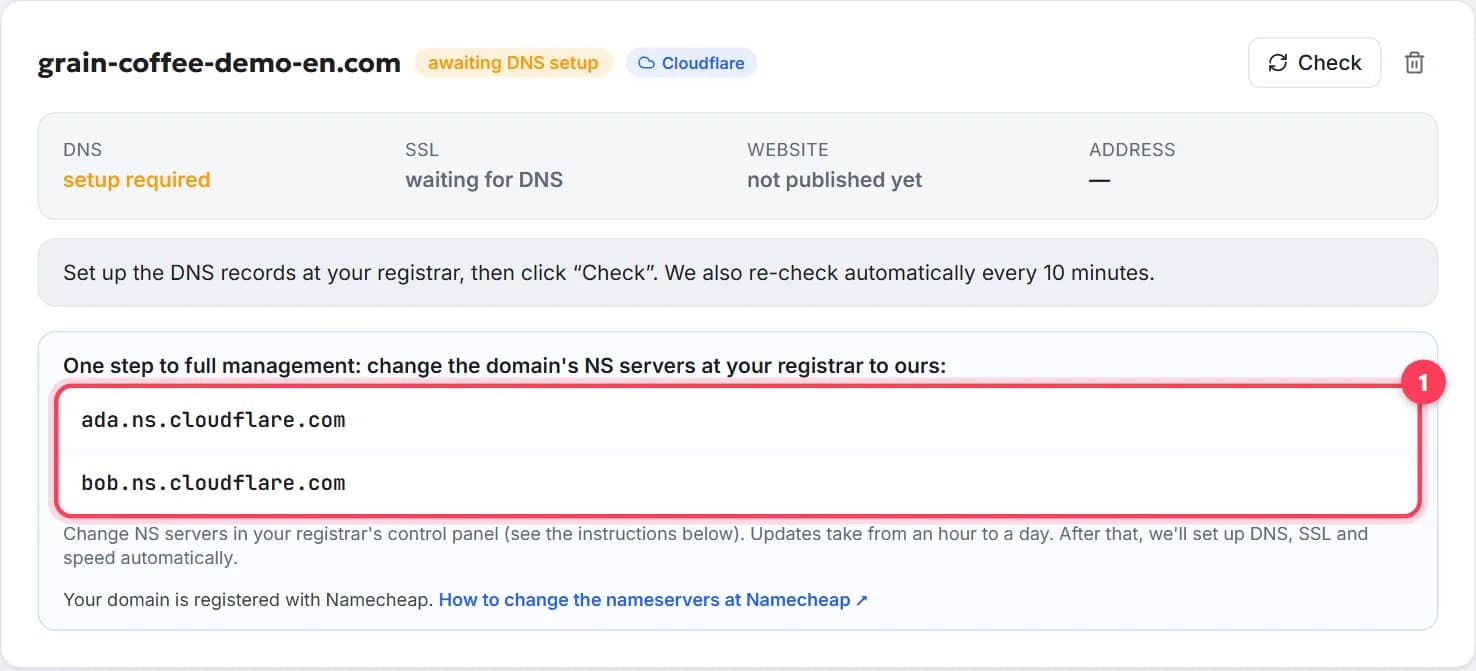
How to change the nameservers of a domain, step by step
Change your domain's nameservers in 5 minutes: what they are, where to click at GoDaddy, Namecheap, Porkbun, IONOS, how long it takes, what about email.
7 min readHow to transfer a domain to another registrar, step by step
Transfer a domain name to a new registrar in 5 steps: unlock, get the EPP/auth code, the 60-day rule, how long it takes, cost, what keeps working.
9 min read