Domain not working? Bought a domain but the website doesn't open: a 10-minute checklist
A domain that “doesn't work” almost always comes down to one of ten causes, and you can rule most of them out in ten minutes without technical knowledge: the domain isn't active yet, it has no records or the wrong nameservers, the change is still propagating, `www` is missing, the SSL certificate isn't issued, your browser cached the old page, or the registrar's parking page is still in the way. Go down the list in order — each item says what you'd see, why, and what fixes it.
First, 60 seconds: what exactly do you see?
| What you see | Likely cause | Jump to |
|---|---|---|
“This site can't be reached”, DNS_PROBE_FINISHED_NXDOMAIN, “server not found” | The domain has no DNS answer at all: not active, no records, wrong nameservers, or the change hasn't spread yet | Steps 1–4 |
| Registrar's parking page / “this domain was bought at…” / ads | Nameservers still point to the registrar's parking service | Steps 3, 8 |
| Works without www but not with (or the other way round) | No record for www (or for the apex) | Step 5 |
| “Your connection is not private” / certificate error | DNS has landed, the SSL certificate (TLS)An SSL (TLS) certificate proves a website is genuinely yours and encrypts the connection — that's the padlock and https:// in the browser. Modern hosts issue it free and renew it automatically.→ certificate isn't issued yet (or was issued for a different name) | Step 6 |
| The old website or an old version | Browser/OS cache, or an old record still in DNS | Steps 4, 7 |
| Cloudflare error page 52x, or a blank page with a CDN logo | The proxy/CDN can't reach the server behind it | Step 9 |
| Host's “default page” / “site not published” | DNS is fine; the site itself isn't published on that host yet | Step 10 |
Check your domain
Enter a domain to see its current nameservers, where the website points, whether www and email are set up, and which registrar it's with.
Domain not working: the checklist, in order
Step 1
1. Is the domain actually registered and paid for?
Open your registrar account → the domain's page. Look for status Active, and the expiry date. A domain that was ordered but not paid, or whose payment failed, isn't live. An expired domain stops resolving within days of the expiry date — renew it (there's usually a grace period, then a pricier “redemption” period). How to know it's fine: status Active, expiry in the future.
Step 2
2. Is the domain verified or on hold?
Registrars must verify the contact email for new registrations (the ICANN rule): an unconfirmed email after about 15 days puts the domain on clientHold — it simply stops working, with no error at the registrar's homepage. Check your inbox for a “verify your contact details” message and click the link. Some country domains (
.de,.eu,.it, etc.) may ask for extra documents — the registry's rules apply. How to know it's fine: no “hold”/“suspended” status, no pending verification banner.Step 3
3. Are the nameservers the right ones?
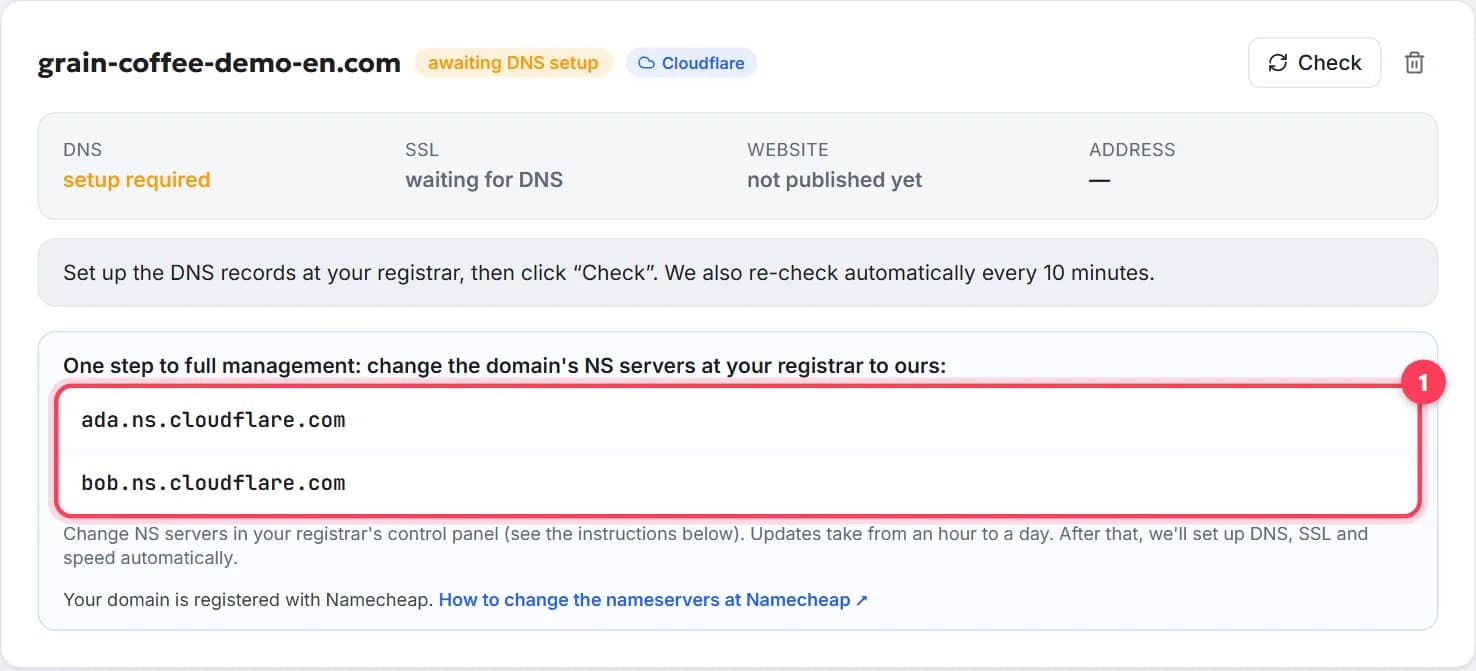
Run the tool above and compare the Nameservers (NS)Nameservers are the servers that hold your domain's DNS records. Changing them (usually two addresses like ns1.example.net) hands the whole DNS setup to a new provider — the simplest way to connect a domain to a website.→ it shows with what your host or website platform told you to set. Common slips: only one of the two entered, a typo, the registrar's defaults left in alongside the new ones, or the change entered on a different domain. On WebFora the two nameservers are on the domain card in the dashboard. How to know it's fine: the tool shows exactly the nameservers you were given — nothing else.
Step 4
4. Is it still propagating?
If you changed something less than a day ago and
dnschecker.orgshows a mix of old and new answers — that's DNS propagationDNS propagation is the time it takes for a DNS change to be seen everywhere, as caches around the world expire. Usually minutes to a few hours; nameserver changes can take up to 24–48 hours.→, not an error. A nameserver change takes 1–24 h, an A record 15–60 min. Details and realistic timings: How long DNS changes take. How to know it's fine: dnschecker shows the new value everywhere; if nothing changed after 24 h, it's not propagation — go back to step 3.Step 5
5. Does www have a record?
domain.comandwww.domain.comare two separate names. If one works and the other doesn't, the second one has no A recordAn A record is the DNS entry that says «this name lives at this IPv4 address». It's how a domain is pointed at a server when you connect by IP instead of changing nameservers.→ or CNAME recordA CNAME record makes one name an alias of another — e.g. www.yourdomain.com → yourdomain.com, or shop.yourdomain.com → your shop platform's address. Used for www and subdomains, not for the bare domain.→. Add it the same way as the first (your host tells you which). Platforms that manage DNS for you (WebFora included) create both. How to know it's fine: both addresses open the same site.Step 6
6. Is the SSL certificate issued?
A certificate error right after DNS lands is normal for 5–30 minutes — the host is issuing it. If
http://domain.comopens buthttps://errors after an hour, the certificate wasn't issued: typically because DNS pointed elsewhere at issue time, or www wasn't included. On WebFora the card shows “issuing SSL certificate” and retries automatically; if it says the issuance failed, message your manager. More: SSL certificate for a website. How to know it's fine: padlock on bothhttps://domain.comandhttps://www.domain.com.Step 7
7. Is it your browser?
Browsers cache DNS answers and whole pages. Open the site in a private window, or on your phone over mobile data. On Windows run
ipconfig /flushdns; or pressCtrl+F5. If it works there, the domain is fine — your network just needs time. How to know it's fine: the new site opens in a private window / on another network.Step 8
8. Is the registrar's parking page in the way?
New domains point to the registrar's parking service by default. If you still see it after the nameservers were changed, either the change wasn't saved (step 3) or the registrar has a “domain forwarding”/“parking” setting switched on that overrides DNS. Turn it off in the domain's settings. How to know it's fine: no parking/forwarding options are enabled; the tool shows your host's nameservers.
Step 9
9. Proxy / CDN in between?
If the domain goes through Cloudflare's proxy (orange cloud) or another CDN, errors 520–526 mean the proxy can't talk to the real server — usually an SSL-mode mismatch or the server not knowing the domain yet. Switch the record to “DNS only” while connecting, or follow your host's instructions. On WebFora this is handled on our side — just tell your manager what you see. How to know it's fine: the site opens with no 52x pages.
Step 10
10. Is the site itself published?
DNS can be perfect while the host shows “site not published”, “coming soon” or a default page: the domain is connected, but no website is assigned to it yet. On WebFora the domain card says “DNS verified — the site will appear here as soon as the version is published”; the site goes live on the domain automatically after publication. How to know it's fine: your actual site opens on the domain.
If your domain is connected to WebFora
The domain card in the dashboard already runs this checklist for you: it shows what the last automatic check found (nameservers not found yet, DNS verified but SSL pending, site not published, and so on) and re-checks every 10 minutes. If the status doesn't change for a day or shows an error you don't understand, message your manager in the dashboard chat — they look at the real DNS and tell you exactly what to click at the registrar. Full walkthrough: Connecting a domain in the WebFora dashboard.
Where to look at popular registrars
| Registrar | Status / expiry / verification | Nameservers & forwarding |
|---|---|---|
| Namecheap | Domain List → domain (status, expiry; verification banner at the top) | Manage → Nameservers; Manage → Redirect Domain |
| GoDaddy | My Products → domain (status, renewal) | DNS → Nameservers; Forwarding section on the same page |
| Porkbun | Domain Management → domain details | Authoritative Nameservers; URL Forwarding |
| IONOS | Domains & SSL → domain | Domain → Name server; Destination / Forwarding |
| Cloudflare Registrar | Domain Registration → Manage domains | Nameservers can't be changed — use records in DNS → Records instead |
Names change over time; if a section isn't where the table says, search the registrar's help for “nameservers” or “domain status”.
Mistakes that look like “the domain is broken”
- Typing
https://www.into the DNS Name field instead of@orwww. - Mixing two methods: nameservers changed *and* A records left at the registrar — now only one of them matters (the nameservers) and the records you keep editing are ignored.
- Two A records for
@— one visitor gets the old site, the next the new one. - “Domain forwarding” switched on at the registrar — it silently sends everyone elsewhere.
- Waiting out a typo. Propagation never fixes a wrong nameserver; after 24 h with no change, re-read what you entered.
- Checking only from the office Wi-Fi — it may cache for days. Mobile data is your second opinion.
FAQ
I bought a domain but the website doesn't show — why?+
Most often the domain isn't pointed anywhere yet (no nameservers/records set), the change is still propagating, or the registrar's parking page is still on. Run the DNS check above and go through the 10 steps in order.
What does DNS_PROBE_FINISHED_NXDOMAIN mean?+
The domain name doesn't resolve to any address: it's not registered or expired, has no records, points to wrong nameservers, or the change hasn't spread yet. It's never a problem with the website itself.
How do I know if my domain is expired?+
Open the registrar account: the domain page shows the expiry date and status. A public WHOIS/RDAP lookup shows the same (“Expiry Date”, status like clientHold or redemptionPeriod). Renew as soon as possible — late renewal gets more expensive.
Why does my domain show the registrar's parking page?+
New domains point to the registrar's parking service by default. Either the nameservers weren't changed (or weren't saved), the change is still propagating, or a “forwarding/parking” option is still switched on at the registrar.
Why does www.domain.com work but domain.com doesn't?+
They are two separate names and each needs its own record. Add an A record (or the record your host specifies) for the missing one; a managed platform creates both automatically.
The domain works on my phone but not on my computer — is it broken?+
No. Your computer or home network still has the old DNS answer cached. Use a private window, flush the DNS cache or wait — it resolves itself within hours.
How long should I wait before deciding something is wrong?+
An hour for A-record changes, up to 24 hours for nameserver changes. If dnschecker.org shows no change anywhere after that, the change wasn't saved correctly — recheck the nameservers you entered.
What do I do if my WebFora domain card shows an error?+
Read the note on the card — it names the result of the last check. If it isn't clear what to change at the registrar, message your manager in the dashboard chat; they'll check the real DNS and tell you exactly what to fix.
Was this guide helpful?
Related guides
How to connect a domain to a website, step by step
Point your domain to your website in 5 minutes, free: nameservers or A record, where to click at GoDaddy or Namecheap, how long it takes, how to check.
8 min readHow long DNS changes take to propagate — and how to check
How long does DNS take to propagate? Real timings for A records and nameservers, what TTL means, why one device sees the site and another doesn't.
6 min readSSL certificate for a website: what it is and how to get one free
What SSL/HTTPS does for a business site, free vs paid certificates, why the padlock shows an error, what mixed content is and how to check in 1 minute.
7 min read